
Best iPhone Duo apps in 2026
20 picks for work, play and everyday life. What changes when you unfold, what each app costs, and where to check the details.
Start with what you want to do.
The most interesting iPhone Duo apps give the extra screen space a purpose. Some put two useful views together. Others make opening or partly folding the phone part of the interaction. Here are 20 apps with publicly documented Duo support, selected across different everyday uses.
iPhone Duo apps at a glance
Prices refer to the U.S. App Store on October 23, 2026. “Free” means free to download; paid features and services may still be required. Follow an app name for the foldable details and sources.
| App | Useful for | U.S. price / access |
|---|---|---|
| AskZine (ours) | A quiet answer ritual | US$1.99, one-time purchase |
| Deck-Man | An album-focused, nostalgic music player | US$4.99, one-time |
| Tiny Computers | Exploring playful recreations of vintage computers | US$3.99, one-time |
| Portal | Nature sounds and focus timers | Free; optional Premium |
| Craft | Formatted documents, daily notes and connected tasks | Free; in-app purchases |
| Bear | Markdown writing, tagged notes and a personal knowledge library | Free; optional Pro |
| Agenda | Meeting preparation and project notes linked to dates | Free; optional Premium |
| Penbook | Flexible paper planners, handwritten notes and PDF markup | Free; optional Premium |
| ThinkScribe | Reviewing meeting or lecture transcripts alongside a summary | Free; optional Pro |
| Things 3 | Personal projects, daily priorities and quick task capture | US$9.99 |
| Finalist | A paper-inspired daily planner combining events, tasks and notes | Free; paid full access |
| Detail | Recording interviews, vlogs, and reaction videos | Free; in-app purchases |
| Netflix | Shows and movies across both screens | Free app; membership required |
| Amazon Prime Video | Watching a show while checking cast information | Free; paid content / plans |
| MLB | Watching baseball while following live statistics | Free; paid live access |
| Tripsy | Organizing a trip's itinerary, documents, and expenses | Free; optional Pro |
| Slopes | Tracking ski days and inspecting resort maps | Free; optional Premium |
| CARROT Weather | Detailed forecasts and larger weather maps | Free; optional Premium |
| Sofa | Keeping media lists and reading podcast transcripts | Free; in-app purchases |
| Overcast | Podcast listening with readable episode information | Free; optional Premium |
Play, listen and pause
AskZineOur app
A quiet answer ritual
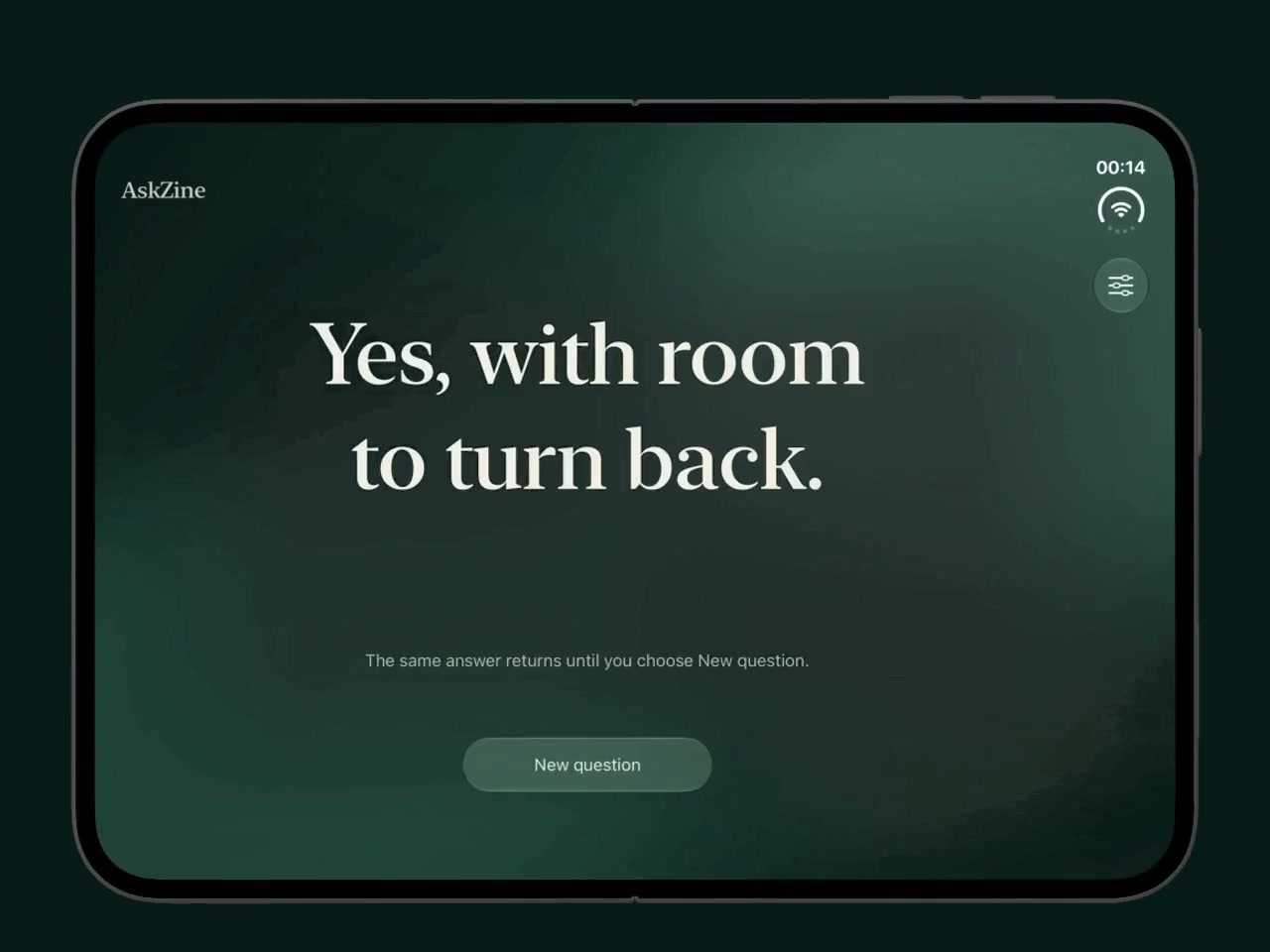
Keep a question in mind, then unfold to reveal a short response. AskZine draws from 80 responses stored on your device; it does not hear or interpret your question.
On iPhone Duo: The reveal follows the hinge angle. Pause partway to pause the reveal; close and reopen to return to the same answer.
Before you choose: For entertainment and reflection, not advice. Ordinary iPhone and iPad users tap to reveal. We develop AskZine; it is included with that relationship disclosed.
Deck-Man
An album-focused, nostalgic music player
Deck-Man presents your albums as virtual cassette tapes. The physical opening and closing of the phone becomes part of choosing an album and starting to listen.
On iPhone Duo: Opening the phone reveals cassette-style album selection; closing it starts listening.
Before you choose: The purchase covers the player, not a music catalog. It supports Apple Music and local music files.
Tiny Computers
Exploring playful recreations of vintage computers
Tiny Computers is a collection of ten playful, vintage-inspired machines, with drawing tools, command lines and small games. Duo turns the collection into a miniature computer you can prop on a desk.
On iPhone Duo: Tabletop mode separates the computer screen and working keyboard; the closed phone shows the collection.
Before you choose: These are playful, vintage-inspired computers. The developer does not claim compatibility with arbitrary original software or full operating-system emulation.
Portal
Nature sounds and focus timers
Portal combines nature scenes with spatial audio and timers for focused work or a quiet break. Its free tier offers a small rotating selection; the full library requires Premium.
On iPhone Duo: Version 4.1.0 adapts focus, Pomodoro, sleep and alarm views to closed, unfolded, seated and standing poses. Opening the phone becomes part of revealing a nature scene.
Before you choose: Free download with in-app purchases. The full library requires a subscription or lifetime purchase; head-tracked audio needs compatible headphones.
Notes, writing and recordings
Craft
Formatted documents, daily notes and connected tasks
Craft combines formatted documents, daily notes and tasks. Its larger-screen editing layout is useful when the appearance of a document matters alongside the words themselves.
On iPhone Duo: Inner- and outer-display support; Apple documents an unfolded style gallery beside a live preview.
Before you choose: Free download with in-app purchases. This guide describes the published layout, not a hands-on review.
Bear
Markdown writing, tagged notes and a personal knowledge library
Bear is a Markdown notebook built around writing, tags and links between notes. Consider it if you already prefer a text-first workspace and want a developer-confirmed Duo version.
On iPhone Duo: Explicit Duo readiness is documented; the release note does not specify a pose-dependent layout.
Before you choose: Sync and advanced features require Bear Pro. The developer confirms Duo support without describing a particular fold layout.
Agenda
Meeting preparation and project notes linked to dates
Agenda connects notes with dates and calendar events. It suits meeting preparation and project work where you want to keep context close to what you are writing.
On iPhone Duo: Closed: buttons move to the side column. Partly folded: the sidebar and notes occupy opposite sides of the fold.
Before you choose: The cited release note does not describe the fully flat layout. Premium features require an additional purchase.
Penbook
Flexible paper planners, handwritten notes and PDF markup
Penbook offers notebooks with customizable stationery, calendar-aware planners and PDF import. Its Duo update focuses on fitting notebook pages and navigation to the changing display.
On iPhone Duo: Version 8.1 adds Duo pose support, stationery sizes and a minimap update; 8.1.1 fixes an incorrect stationery size.
Before you choose: Unlimited notebooks and export require Premium. The release notes do not explain every pose’s layout.
ThinkScribe
Reviewing meeting or lecture transcripts alongside a summary
ThinkScribe records and transcribes speech on the device, with summaries and notes for reviewing a recording. The Duo layout is useful for comparing a condensed summary against the original transcript.
On iPhone Duo: In the unfolded landscape orientation, Side by Side shows the transcript and its summary together. The voice keyboard also works on Duo.
Before you choose: Pro features can be sampled for free; continued access requires a monthly, yearly or lifetime purchase. Automatic summaries are a Pro feature.
Tasks and daily planning
Things 3
Personal projects, daily priorities and quick task capture
Things brings tasks, projects and daily priorities into a focused planner. It is a useful starting point for checking a short list while closed, then opening the phone for a broader planning session.
On iPhone Duo: The developer documents pose-aware layouts, an unfolded list sidebar, right-side controls including Magic Plus, and external-keyboard support.
Before you choose: Mac, iPad and Apple Vision Pro editions are sold separately. Duo behavior has not been hands-on tested for this guide.
Finalist
A paper-inspired daily planner combining events, tasks and notes
Finalist combines events, tasks, notes and reminders in a paper-inspired planner. Its remembered layouts suit people who want a quick view in one pose and a broader workspace in another.
On iPhone Duo: The Planner saves a layout for each open/closed and upright/sideways state. Daily workspaces also retain their own layout per Duo pose.
Before you choose: Full functionality requires a subscription or one-time lifetime purchase. Pose switching has not been hands-on tested for this guide.
Camera, films and live sport
Detail
Recording interviews, vlogs, and reaction videos
Detail combines video recording and editing on your phone. Its outer-screen tools are especially relevant when you want to film yourself with the rear camera and still see the shot.
On iPhone Duo: Three-camera switching; outer-display preview and teleprompter; simultaneous outer/rear recording through Book Mode.
Before you choose: Free download with in-app purchases. The release notes do not specify which Duo features, if any, require payment.
Netflix
Shows and movies across both screens
A familiar starting point if you already subscribe: browse shows, films and short previews, then settle into something longer on the inner screen.
On iPhone Duo: Apple describes browsing Clips on the outer screen, then continuing on the inner screen with layouts that adapt to orientation.
Before you choose: The app is free to download; watching requires a Netflix membership. Availability depends on your region and plan.
Amazon Prime Video
Watching a show while checking cast information
Prime Video offers films, series and live sports, with downloads and optional additional channels. Its Duo layout keeps the show visible while you look up the people appearing in it.
On iPhone Duo: Apple places video on the upper half and X-Ray cast or bonus information on the lower half when partially folded.
Before you choose: A free download is not free access to the catalog. Memberships, rentals, purchases, and optional channels can carry separate charges.
MLB
Watching baseball while following live statistics
MLB brings baseball broadcasts, highlights and game information together. Its Duo layout is useful for fans who want the action and the statistics in view at once.
On iPhone Duo: Apple describes live video above the fold and real-time statistics below it in tabletop use.
Before you choose: A free download does not include every live game. The listing places out-of-market games behind a subscription and some MLB Network programming behind pay-TV authentication.
Travel, weather and downtime
Tripsy
Organizing a trip's itinerary, documents, and expenses
Tripsy keeps itineraries, reservations, documents and expenses together. Its confirmed Duo update makes it a useful candidate for planning and consulting a trip on the larger display.
On iPhone Duo: Version 3.10.3 adds adaptive layouts, toolbars, and navigation for iPhone Duo.
Before you choose: Advanced features require Pro. The release notes do not describe a distinct tabletop or outer-display workflow.
Slopes
Tracking ski days and inspecting resort maps
Slopes records ski and snowboard sessions and helps you review your runs. Opening a larger map is a practical use of the inner display between runs or when looking back at a day.
On iPhone Duo: A smaller map in the folded interface expands to a larger, full-screen map when opened.
Before you choose: Interactive resort maps are a Premium feature. Map availability varies by resort and region.
CARROT Weather
Detailed forecasts and larger weather maps
CARROT Weather combines configurable forecasts, weather maps and an optional dose of personality. Consider it when you want more detail than a quick temperature check.
On iPhone Duo: Version 6.9.2 explicitly adds Duo support and multiple windows. It also improves vertical and horizontal dual-pane radar layouts on larger screens.
Before you choose: Advanced radar requires Premium Ultra. The update does not describe an interaction triggered by the hinge.
Sofa
Keeping media lists and reading podcast transcripts
Sofa organizes the books, films, games, shows and podcasts you want to spend time with. It combines media planning with podcast playback and transcripts.
On iPhone Duo: Lists and selected content share two columns; the podcast transcript moves to the upright half in laptop pose.
Before you choose: Some features require paid in-app purchases. A show's supplied transcript is used when available; Sofa can also generate a transcript on the device.
Overcast
Podcast listening with readable episode information
Overcast focuses on podcasts, with Smart Speed, Voice Boost, downloads and playlists. Its Duo update gives listeners more room to read the information accompanying an episode.
On iPhone Duo: Version 2026.10.1 improves Duo and iPad layouts and expands space for transcripts, show notes, and chapter lists on the playback screen.
Before you choose: Podcast-promotion ads fund the free app; Premium removes them. No specific half-folded or outer-display behavior is documented.
Common questions about iPhone Duo apps
Which iPhone Duo apps should I try first?
For a small starting set, consider Things 3 for tasks, Detail for recording, Prime Video for watching, and Portal for a quiet break. AskZine, our own app, is a simple way to try an answer reveal controlled by the fold. Choose by what you want to do; the list is grouped by use, not ranked.
Which apps use the fold itself?
AskZine reveals an answer as you unfold. Deck-Man turns opening and closing into a cassette-player interaction. Tiny Computers separates a screen and keyboard in tabletop use. MLB and Prime Video put different kinds of information on each half while partly folded. See each entry for its source.
Are these iPhone Duo apps free?
Most are free to download, with paid features, content or subscriptions. In the U.S. store at the time of checking, AskZine costs US$1.99, Tiny Computers US$3.99, Deck-Man US$4.99 and Things 3 US$9.99. A free streaming app does not include a free streaming subscription.
How can I check whether an app is optimized for iPhone Duo?
Check its current App Store listing and version history for an explicit Duo update. Apple also identifies optimized apps with a Made for iPhone Duo badge. Look for a described change—such as a sidebar, outer-screen preview or pose-aware layout—rather than assuming that a compatible app uses every foldable feature.
Is this Apple’s official list or a hands-on review?
Neither. This is an independent selection published by the developer of AskZine. We used Apple’s editorial selections as a starting point and checked the published sources linked beside each app. We have not tested these third-party apps on Duo hardware, and we do not imply Apple endorses this guide or AskZine.
Apple’s explanation of optimized apps and the App Store badge.
How this guide was put together
Apple’s launch coverage and editorial selections provided the starting pool. We also consulted the developer-published Chonky guide and ThinkScribe guide to find candidates. Those lists are useful discovery sources; the individual recommendations above link to Apple or the app’s own published information.
- Selection: explicit, publicly linkable Duo support and a useful mix of tasks, media, travel and playful interactions.
- Evidence: App Store descriptions and release notes, developer documentation, or Apple’s October 22 announcement. Where only general adaptation is confirmed, we say so.
- Testing: this is a researched guide. We have not installed and compared these third-party apps on Duo hardware. AskZine’s illustrated demonstration comes from the simulator.
- Pricing: U.S. download prices and broad payment models, checked October 23, 2026. These are not total-cost comparisons. Local prices, subscriptions and availability can change.
- Scope: a curated selection, not a complete compatibility directory. An app missing here may still support Duo.
Found a changed feature or price? Make an app with a documented Duo experience? Send the App Store link and supporting release notes so we can review a correction or addition.
Want to try the fold-driven answer ritual? Get AskZine for US$1.99, or see how it works.